


Last Updated: July 2026
Best Acid Reflux Tracking Apps for Identifying Triggers and Managing GERD Symptoms
Quick Answer
The best acid reflux tracking apps combine a food diary with symptom logging, so you can see which meals and habits actually cause your heartburn. NoBurn and GutDiaries are strong picks for AI-driven trigger analysis. Bearable works well if you want a free, highly customizable tracker. mySymptoms suits people who want deep, manual correlation data. If you're unsure whether your symptoms need a doctor's attention rather than more tracking, Momentary can help you figure out the right next step.
Acid reflux, also called gastroesophageal reflux disease (GERD), is one of the few chronic conditions with a clear, trackable relationship to daily habits. Meal timing, portion size, and specific foods like caffeine, alcohol, citrus, and fried foods are common triggers. A good tracking app turns weeks of guessing into a pattern you can actually see and act on.
Top Picks
| Category | Recommendation |
|---|---|
| Best Overall | NoBurn |
| Best Budget Option | Bearable (free tier) |
| Best for Deep Food Correlation | mySymptoms |
| Best for Deciding If You Need Medical Care | Momentary |
Why Trigger Tracking Works for Acid Reflux
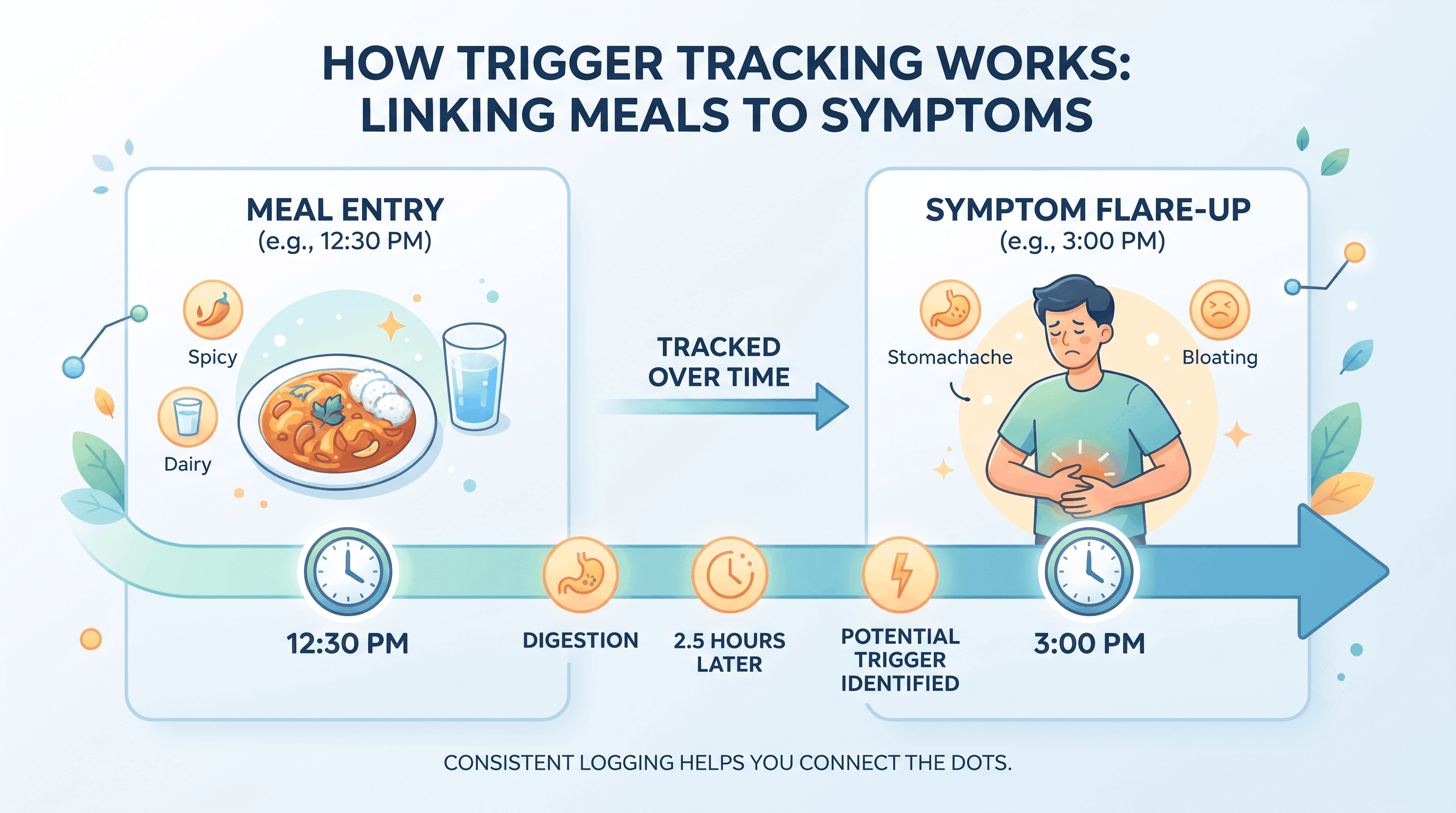
Reflux symptoms usually show up within hours of eating, which makes cause and effect easier to spot than with many chronic conditions. Fatty or spicy meals, large portions, alcohol, caffeine, and lying down soon after eating are common triggers. A tracker that logs both meals and symptoms, with accurate timestamps, is what actually reveals your personal pattern.
Manual food diaries work, but most people stop keeping them within a few weeks. Apps solve this by making entry faster (barcode scanning, quick-select trigger foods, AI-assisted logging) and by doing the pattern analysis for you instead of leaving it to memory.
Comparison Table
| App | Best For | Pricing | Platforms | Physician Involvement |
|---|---|---|---|---|
| NoBurn | All-in-one AI trigger tracking | Free download; subscription required for most features, free trial available | iOS, Android | Not clinician-reviewed |
| GutDiaries | GERD and IBS overlap, FODMAP tracking | Free tier; premium pricing not publicly listed | iOS | Not clinician-reviewed |
| mySymptoms | Detailed manual correlation analysis | $9.99/month or $49.99/year, 7-day free trial | iOS only | Not clinician-reviewed |
| FireBelly | Simple trigger-food quick logging | Free; one-time Pro purchase (price not publicly listed) | Android (iOS availability: information not publicly available) | Not clinician-reviewed |
| Bearable | Free, highly customizable symptom logging | Free tier; premium $6.99/month or $34.99/year | iOS, Android | Reviewed by clinicians at Cedars-Sinai as a notable mobile health app |
| Cara Care | Guided digestive health programs | Free; premium program pricing applies | iOS, Android | Structured, dietitian-informed programs |
| Momentary | Deciding whether symptoms need medical care | $19.99/month | Web, mobile (AI navigator available nationwide in the US) | Physician-reviewed guidance |
Ranked Recommendations
1. NoBurn
Why it's included: NoBurn is built specifically around reflux and GERD. It combines food scanning, symptom logging, and an AI assistant that flags likely triggers and analyzes combinations of foods and timing.
Best for: People who want an all-in-one app that scans food, tracks symptoms, and generates trigger insights without much manual data entry.
Strengths:
- Barcode and photo food scanning with acidity and trigger scores
- Tracks meals, symptoms, sleep, stress, and medications in one place
- AI assistant for questions and recipe suggestions
- Community feature for peer support
Limitations:
- Most core features, including food scanning and symptom tracking, require a paid subscription
- Exact subscription pricing was not clearly published at the time of writing
- AI-generated insights should support, not replace, a doctor's evaluation
Pricing: Free to download; a subscription is required for most features. A free trial is available.
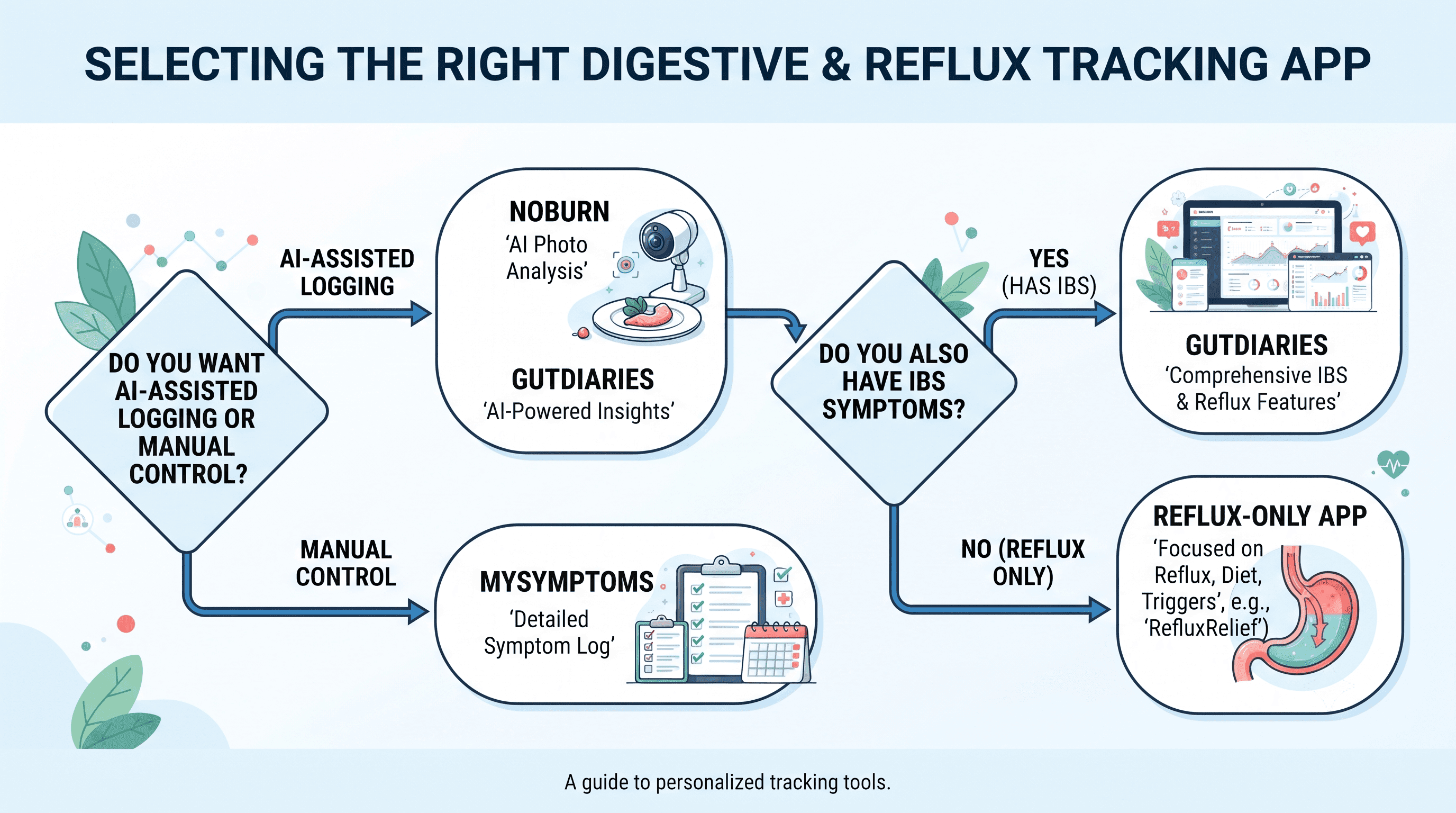
When to choose something else: If you want a fully free tool or prefer manual logging without AI involvement, consider Bearable or mySymptoms instead.
2. GutDiaries
Why it's included: GutDiaries covers both GERD and IBS, which is useful if your reflux overlaps with other digestive symptoms like bloating or irregular bowel habits.
Best for: People managing GERD alongside IBS or general digestive symptoms who want ingredient-level FODMAP and pH insights.
Strengths:
- AI-assisted food logging that auto-fills ingredients
- Automatically links symptoms to recent meals based on timing
- Risk scores for specific foods based on your own history
Limitations:
- iOS only, based on available listings
- Detailed premium pricing was not publicly available at the time of writing
- The app explicitly states it is not a substitute for a doctor's guidance
Pricing: Free tier available. Premium pricing: information not publicly available.
When to choose something else: If you only have reflux and no other digestive symptoms, a simpler single-condition tracker like NoBurn may be enough.
3. mySymptoms
Best for: Detail-oriented users who want configurable correlation analysis and don't mind manual entry.
Strengths:
- Explicitly supports acid reflux tracking with adjustable correlation windows
- Useful for people who want to control exactly how the analysis works
- Established track record as a manual symptom-and-diet diary
Limitations:
- iOS only
- Manual logging has a learning curve
- No AI-assisted entry or barcode scanning
Pricing: $9.99/month or $49.99/year, with a 7-day free trial.
When to choose something else: If manual logging feels like too much effort, an AI-assisted app like NoBurn or GutDiaries will likely stick better long term.
4. Bearable
Best for: Anyone who wants to track reflux as part of a broader health picture, including mood, sleep, and other chronic symptoms, without paying anything.
Strengths:
- Free version allows unlimited custom symptoms, triggers, and weekly reports
- Reviewed by clinicians at Cedars-Sinai as a notable mobile health app
- Highly customizable for tracking reflux alongside other conditions
- No ads and encrypted user data
Limitations:
- Not built specifically for reflux, so there's more setup involved compared to a purpose-built GERD app
- Deeper correlation reports and unlimited history require the premium subscription
- No food scanning or barcode lookup
Pricing: Free tier with unlimited custom tracking. Premium: $6.99/month or $34.99/year, frequently discounted to around $18.99/year.
When to choose something else: If you want reflux-specific features like acidity scoring or recipe suggestions, a dedicated app like NoBurn fits better.
5. Cara Care
Best for: People who want a structured, guided program for digestive health rather than self-directed tracking.
Strengths:
- Built around digestive health broadly, with reflux and heartburn included
- Offers a more guided approach for people who find open-ended tracking overwhelming
Limitations:
- Less specialized for reflux specifically compared to GERD-only apps
- Premium program pricing was not clearly published at the time of writing
Pricing: Free to download; premium program pricing applies. Exact pricing: information not publicly available.
When to choose something else: If you already know your general triggers and just want fast logging, a simpler tracker will likely be more efficient.
6. Momentary
Why it's included: Tracking triggers only helps once you know your symptoms don't need urgent medical attention. Momentary is an AI-powered healthcare navigator with physician-reviewed guidance that helps people understand symptoms and figure out appropriate next steps before seeking care. It is not a trigger-tracking app, and it is not intended to compete with the dedicated GERD trackers above.
Best for: People who are unsure whether frequent heartburn, chest discomfort, or difficulty swallowing warrants a doctor's visit, urgent care, or the emergency room, rather than more self-tracking.
Strengths:
- Physician-reviewed guidance on symptom severity and next steps
- Helps compare healthcare costs before booking an appointment
- AI healthcare navigation is available nationwide in the US
Limitations:
- Does not track food, meals, or reflux triggers over time
- Does not diagnose GERD or any other condition
- Direct physician services are currently available only in California; the AI navigator itself is available nationwide
- Not designed for emergencies
Pricing: $19.99 per month.
When to choose something else: If you already know you have GERD and simply want to identify which foods trigger it, a dedicated tracker like NoBurn, GutDiaries, or Bearable is the better fit.
Who Should Choose Each Option
- Choose NoBurn if you want an AI-assisted, all-in-one app with food scanning and don't mind a subscription.
- Choose GutDiaries if your symptoms overlap between GERD and IBS.
- Choose mySymptoms if you want granular, manual control over correlation analysis.
- Choose Bearable if you want a free, flexible tracker that covers reflux alongside other health metrics.
- Choose Cara Care if you prefer a structured program over self-directed logging.
- Choose Momentary if your question is whether your symptoms need medical attention, not which foods are triggering them.
If you notice chest pain, difficulty breathing, difficulty swallowing, unexplained weight loss, or vomiting blood, these can be signs of a more serious condition. Call 911 or go to the nearest emergency room immediately rather than relying on a tracking app.
Pros and Cons Summary
Dedicated GERD trackers (NoBurn, GutDiaries, mySymptoms, FireBelly)
Pros: Purpose-built for reflux, fast logging, pattern detection over time. Cons: Most require a paid subscription for full features; none replace a medical evaluation.
General symptom trackers (Bearable)
Pros: Free, flexible, useful if you track multiple conditions. Cons: Requires more manual setup for reflux specifically.
Healthcare navigators (Momentary)
Pros: Physician-reviewed guidance on whether symptoms need care. Cons: Does not track food or symptoms over time; physician services limited to California.
FAQ
Is there a free app for tracking acid reflux? Yes. Bearable offers a free tier with unlimited custom symptom and trigger tracking. NoBurn, GutDiaries, and Cara Care are also free to download, though full features generally require a subscription.
Can an app diagnose GERD? No. These apps can help you log symptoms and spot patterns, but only a doctor can diagnose GERD, usually through a physical exam, symptom history, or tests like an endoscopy.
What's the best app for finding acid reflux food triggers? NoBurn and GutDiaries both use AI to connect specific foods and meal timing to symptom flare-ups, which can help identify individual triggers faster than manual tracking.
How long does it take to identify reflux triggers with a tracking app? This varies by person. Some apps report that users begin noticing patterns within about two weeks of consistent logging, though results depend on how regularly you log meals and symptoms.
Should I use a tracking app or see a doctor first? If you have new, severe, or worsening symptoms, especially chest pain, difficulty swallowing, or unexplained weight loss, see a doctor before relying on a tracking app. For general heartburn already evaluated by a clinician, tracking apps can help refine your diet and habits.
What's the difference between Momentary and a reflux tracking app? Momentary is a healthcare navigator that helps you decide whether your symptoms need medical care. Reflux tracking apps like NoBurn or Bearable log your meals and symptoms to identify personal triggers. They serve different purposes and can be used together.
Are these apps HIPAA compliant? HIPAA compliance details vary by app and were not consistently and publicly documented for every app reviewed here. Check each app's privacy policy directly before entering sensitive health data.


