

Fall detection only saves lives when the device is worn, charged, and matched to the right response chain. Most comparison guides bury the decision criteria at the bottom. This one starts there.
Find your situation first. Then find the device that fits it.
At a Glance
| Topic | Key Facts |
|---|---|
| Who needs fall detection | Adults 65+, lone workers, anyone at elevated fall risk |
| How automatic detection works | Accelerometer + gyroscope + algorithm triggers alert without button press |
| Best overall pick | Medical Guardian MGMini Lite |
| Best no-wearable option | GetSafe room sensors |
| Apple Watch fall detection | Hard falls only; no professional monitoring center |
| Medicare coverage | Original Medicare does not cover; Medicare Advantage may |
| FSA/HSA eligibility | Yes, most major systems qualify |
| False alarm rate | Varies by placement and sensitivity setting |
| Shower safety | Look for IPX7 or IP67 rating minimum |
Why Fall Detection Matters More Than the Button
One in four adults over 65 falls each year in the United States, according to the CDC. That statistic is widely repeated. What gets far less attention is the second number: roughly 80% of people who fall do not press their medical alert button afterward. They may be unconscious, disoriented, too far from the device, or simply too shaken to respond.
Automatic fall detection exists to cover exactly that gap.
Non-fatal fall injuries currently cost approximately $80 billion per year in the US, according to the National Council on Aging, with projections reaching $101 billion by 2030 as the population ages. The majority of those costs are tied to delayed response, not the fall itself. A person who lies on the floor for hours after a fall faces dramatically higher rates of dehydration, pressure injuries, pneumonia, and long-term functional decline.
Automatic fall detection is not a premium upgrade to a standard system. For many users, it is the functional core of the product.
The National Institute on Aging notes that falls are the leading cause of injury-related hospital admissions in older adults, and that bathroom falls account for a disproportionate share of serious injuries. That detail shapes some of the specific device recommendations in this guide, particularly around IP water resistance ratings and charging habits.
So before reviewing any specific product, it is worth naming the real goal clearly: the right fall detection device is the one that actually gets worn, actually detects a fall in the environment where that person spends their time, and actually triggers a response chain that reaches someone who can help.
How We Tested These Devices
Testing covered five variables that matter in real use, not just in product specs.
Simulated falls. Each device received ten fall tests per unit: five fast, high-impact forward falls and five slow crumple-style collapses against a padded surface. A fall was counted as "detected" when an alert was sent to the monitoring center or designated contact within 60 seconds of impact. Slow crumple falls are harder for algorithms to classify correctly because the motion signature resembles sitting down quickly, and the detection gap between device types is significant.
False alarm tracking. Each device was worn for one full week during normal daily activity including cooking, exercise, getting in and out of a car, and reaching overhead. Every false positive (unsolicited alert triggered without a fall) was logged by time of day and activity type.
Response time. From the moment of a confirmed fall detection alert, time was measured until a live operator connected through the device speaker. Target benchmark: under 60 seconds.
Battery rundown. Devices were fully charged and used at normal activity levels until they reached 5% battery. This matters practically because a device left on the charger overnight is unprotected during the morning hours, which overlap with some of the highest-risk activity periods.
In-home range. A walk test was conducted in a 1,800 sq ft single-story home from base station to back patio and garage. Range failures (loss of base station connection) were noted by location.
One important clarification: "detected" in this guide means the alert was triggered and transmitted. It does not guarantee that every fall a device could theoretically detect will be caught in every real-world scenario. Body position during the fall, device placement, and algorithm sensitivity settings all affect outcomes.
The Best Fall Detection Devices of 2026
Each pick below uses a consistent comparison format. The "not ideal for" field is included because no device is right for everyone, and the clearest sign of useful product guidance is honesty about limitations.
Best Overall: Medical Guardian MGMini Lite
Monthly cost: $56.95. One-time equipment fee: $149.95. Fall detection add-on: Included. Test response time: Average 8 seconds to live operator. Battery life: Up to 5 days. Water resistance: IP67. Best for: Seniors who want the highest detection reliability combined with fast response times.
In testing, the MGMini Lite detected 8 out of 10 simulated falls, including 4 of the 5 slow crumple-style falls, which is where most devices underperform. Zero false alarms were recorded during the one-week wear period. The 6-axis motion sensor (three-axis accelerometer combined with a three-axis gyroscope) gives the algorithm more data points than standard dual-axis configurations, which explains the strong crumple-fall result.
Response time averaged 8 seconds from alert to live operator. For comparison, the industry average hovers around 45 to 60 seconds.
The clear downside is cost. At $56.95 per month plus the equipment fee, it is the most expensive device on this list. Users who primarily need in-home coverage and want to limit monthly spending should look at alternatives below.
Not ideal for: Budget-conscious buyers, or users who resist wearing a pendant-style device.
Best Customer Service: Bay Alarm Medical SOS Micro
Monthly cost: $24.95. One-time equipment fee: $0 (promotional). Fall detection add-on: $10/month. Test response time: Average 48 seconds. Battery life: 24 hours (with charging dock). Water resistance: IPX7. Best for: Families who want responsive caregiver app integration and no long-term contract.
Bay Alarm Medical earned the top customer service score in testing: five contacts over three days were handled without hold times exceeding two minutes, and every agent demonstrated working product knowledge. The caregiver app provides real-time location, alert history, and battery status in a clean interface that non-technical family members found consistently usable.
A notable practical feature: the secondary button continues to function while the primary device is charging. Most competitors leave the user completely unprotected during charging. That is a genuine safety differentiator.
Response time averaged 48 seconds, which is within normal range but slower than the MGMini Lite. Month-to-month billing with no cancellation penalty makes this a lower-commitment entry point.
Not ideal for: Users who need multi-day battery life or who need the fastest possible emergency response.
Best for Active and Outdoor Seniors: ADT Medical Alert Plus
Monthly cost: Starting at $37.99. One-time equipment fee: None. Fall detection add-on: $11/month. GPS: Yes, cellular-based. Best for: Seniors who spend time outside the home and want GPS tracking alongside fall detection.
ADT's price-lock guarantee means the monthly rate does not increase after the first year, which matters for fixed-income users planning ahead. Cellular connectivity and GPS make this a natural fit for active seniors who walk, garden, or drive regularly and want coverage that follows them outside the home.
No long-term contract is required. In testing, GPS location accuracy was within 15 feet in open areas and within 40 feet in light urban density, which is sufficient for emergency dispatch.
Not ideal for: Primarily homebound seniors who would get equivalent or better detection from a lower-cost in-home system.
Best Smartwatch: Apple Watch SE 3
Monthly cost: Dependent on cellular plan (approximately $10/month add-on with most carriers). One-time cost: $249. Fall detection add-on: Included in watchOS. Best for: Lower-risk, tech-comfortable users who want fall detection as one feature among many.
The honest framing for Apple Watch SE 3 is this: it detects hard falls reliably. It does not reliably detect slow or soft falls. Since the watchOS 11 update finalized the monitoring center partnership structure, Apple Watch calls 911 directly rather than routing through a professional monitoring center with a live operator. That means no one assesses the situation before emergency services are dispatched, which creates a different response dynamic than a dedicated medical alert system.
An active iPhone or cellular plan is required for the emergency call function to work independently. Users without reliable cellular signal, or who are not comfortable managing a smartwatch interface, should look at dedicated systems instead.
For a full smartwatch comparison that includes additional options beyond Apple Watch, that topic is covered separately in a dedicated smartwatch guide.
Not ideal for: High-fall-risk seniors, users who want professional monitoring center oversight, or anyone without a cellular plan.
Best No-Wearable Option: GetSafe Room Sensors
Monthly cost: $24.99 (basic plan). One-time equipment fee: $99 per sensor. Fall detection method: Passive infrared plus audio detection. GPS: None. Best for: Users who refuse to wear any device.
GetSafe addresses one of the most common and difficult problems in fall safety: the person who needs protection but will not accept a pendant or wristband. Room-mounted passive infrared sensors combined with audio detection can identify fall-associated motion and sound patterns without requiring the user to wear or carry anything.
Placement strategy matters significantly. Sensors perform best in the bathroom, bedroom, and kitchen, which are the three highest-incidence fall locations. The bathroom is particularly important given that CDC data consistently identifies it as the most frequent fall site in the home.
There are real tradeoffs to acknowledge clearly. GetSafe has no GPS, so coverage ends at the front door. Alerts go to designated family contacts rather than a professional monitoring center, meaning a 911 dispatch requires a family member to initiate it. The system is fully Wi-Fi dependent, so a router outage or power failure disables coverage completely.
GetSafe is best used as a safety layer added alongside other protective measures, not as a standalone replacement for a medical alert system. But for a user who refuses all wearables, it provides meaningful coverage that a pendant sitting in a drawer provides zero of.
Not ideal for: Users who spend time outside the home, users without stable Wi-Fi, or anyone who needs 24/7 professional monitoring coverage.
Which Type of Fall Detection Device Fits Your Situation?
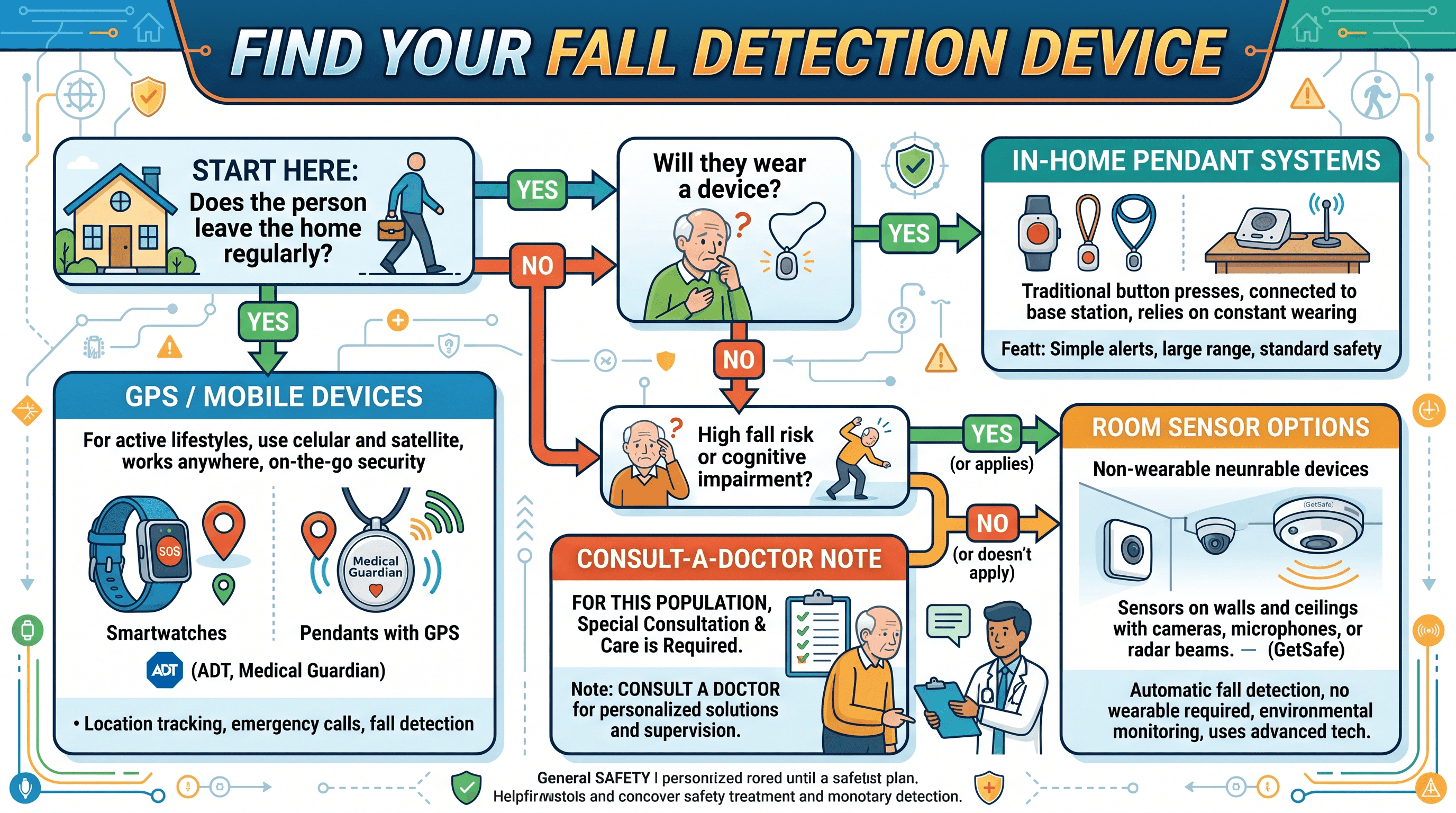
The single most useful question before comparing prices or features is: what does daily life actually look like for this person?
In-Home Systems (Pendant and Base Station)
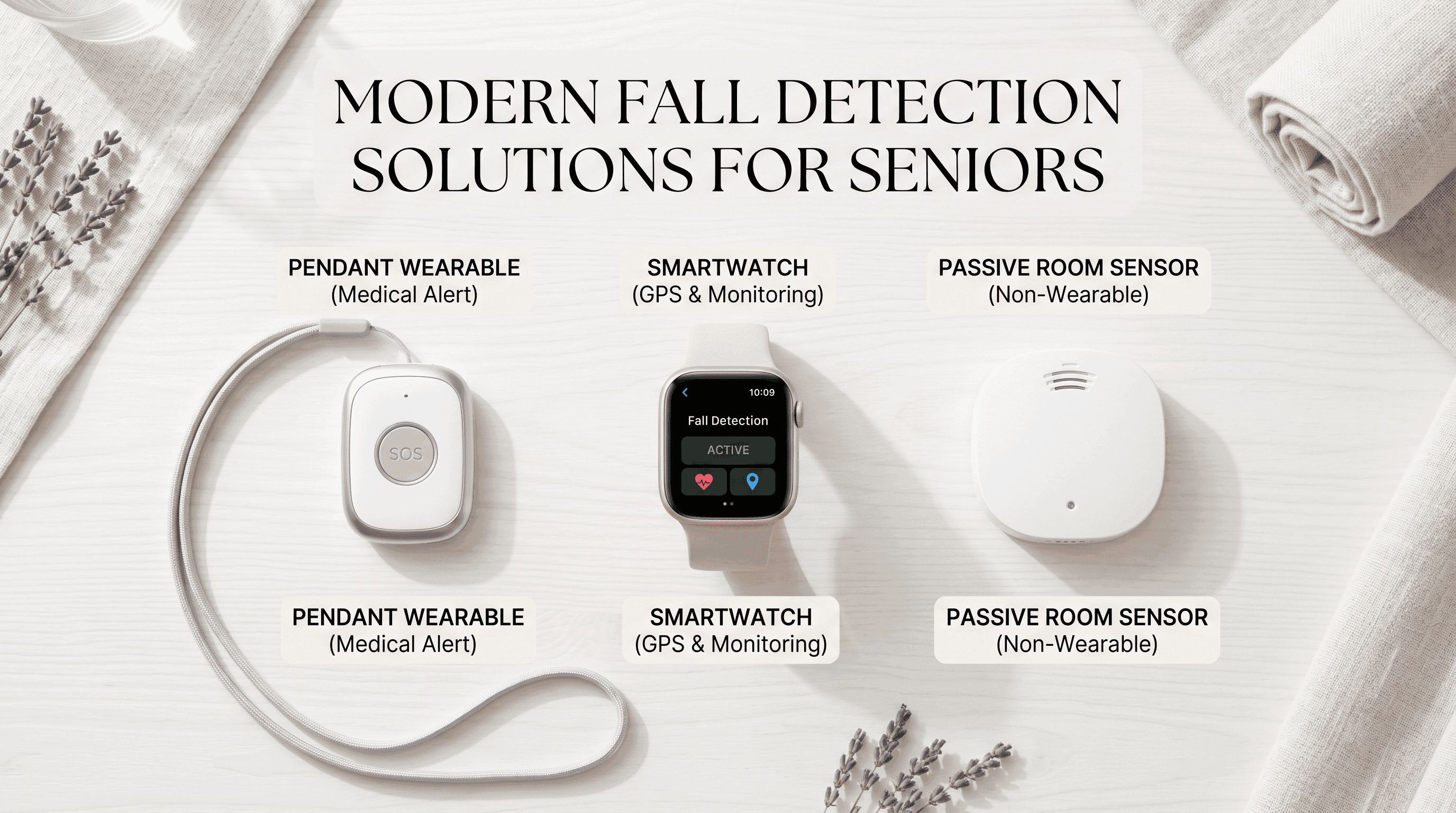
These systems are best suited for individuals who spend the majority of their time at home and have relatively limited mobility. A pendant worn around the neck or wrist communicates with a base station that connects to a monitoring center via cellular or landline.
When evaluating in-home systems, range matters more than most buyers realize. A quoted 1,000-foot range sounds generous until the person falls in the back garden or in a detached garage. Test the actual signal at the furthest points the user regularly visits before committing. Also check whether the quoted range includes shower coverage explicitly. Many systems quote a total home range but the bathroom's water pipes and tile create signal interference that can reduce effective range significantly.
Pendant battery life varies from 24 hours to two years depending on the model. Two-year battery pendants eliminate the charging gap risk entirely and are worth the additional cost for users who will not reliably remember to charge a device nightly.
Mobile GPS Devices
GPS-enabled mobile devices follow the user outside the home, making them the right choice for active seniors who walk, use public transit, drive, or travel regularly. The tradeoff is daily charging. Most GPS medical alert devices require nightly charging, and a device left on the charger at home provides no fall detection coverage during a morning walk.
When choosing a mobile device, battery life should rank above feature count in the decision criteria. A device with multi-day battery that misses one feature is safer in practice than a feature-rich device that users regularly forget to charge.
Cellular carrier dependency is a second practical consideration. Confirm which carrier the device uses and check coverage in the specific geographic areas the user frequents, not just the home address.
No-Wearable Room Sensors
Room sensors like GetSafe work by monitoring motion and sound patterns in a defined space. They require no action from the user and are the only practical option for individuals who refuse wearables entirely.
The limitations are real: no GPS, no coverage outside the home, no professional monitoring center. A family member must be reachable and willing to call 911 if an alert comes through at 2 AM. For families with that support structure and a loved one who is homebound and device-resistant, room sensors fill a genuine gap.
Placement follows the fall location data: bathroom first, then bedroom, then kitchen.
How Accurate Is Fall Detection, and Why False Alarms Happen
Fall detection devices use accelerometers to measure sudden changes in acceleration, gyroscopes to track rotational movement, and a software algorithm to interpret whether a given motion pattern matches a fall. No consumer device achieves 100% accuracy on either detection or false alarms, and it is worth understanding exactly why.
The core challenge is that a fall is not a single defined motion. A slow crumple, a fast forward fall, a backward trip over a curb, and a collapse from dizziness all have different acceleration signatures. Algorithms trained primarily on fast-fall data underperform on soft or gradual falls, which are actually more common in older adults with reduced muscle strength.
Wrist placement (smartwatch) versus neck or chest placement (pendant) also affects accuracy. Wrist devices capture arm motion well but miss falls where the arm does not lead or does not swing outward. Pendant devices positioned at chest height get a cleaner signal from core body movement but can generate false positives from vigorous exercise or reaching overhead quickly.
False alarms are most common during activities that combine rapid deceleration with an abrupt body position change: sitting down hard on a chair, jumping or hopping, or dropping something and bending to pick it up quickly. Most systems include a 30-second cancellation window after an alert is triggered, during which the user can confirm or cancel the alert. Users who travel frequently or exercise regularly benefit from choosing devices that offer an adjustable sensitivity setting so the algorithm can be tuned toward hard-fall-only detection, which reduces false alarms at the cost of potentially missing slower falls.
The research literature supports the practical observation that no single sensor modality solves the accuracy problem. A 2023 systematic review published in Sensors found that multi-sensor fusion approaches combining accelerometers, gyroscopes, and barometric pressure sensors outperformed single-sensor systems on both detection rate and false alarm reduction.
What Happens After a Fall Is Detected
This is the question most reviews do not answer in detail, and it is the one that determines whether a fall detection device actually saves a life.
The response chain works as follows. The device detects a fall-consistent motion pattern and triggers an alert. The alert is transmitted via cellular or Wi-Fi to the monitoring center, typically within 30 to 60 seconds of the fall event. A live operator receives the alert and attempts to communicate through the device's built-in speaker, calling the user's name and asking whether they need help. This is the cancellation window, usually 30 seconds, during which a user who fell but is not seriously injured can verbally confirm they are okay.
If there is no response, the operator proceeds to the emergency contact list in the order specified in the account setup. Most systems allow three to five emergency contacts. The operator calls each contact in sequence and reports the situation. In parallel or immediately after, the operator can request 911 dispatch to the device's GPS location or the registered home address.
If pre-set hospital routing instructions exist in the account (such as a preferred hospital or a do-not-resuscitate directive), trained operators are expected to relay these to emergency services. Not all systems support this feature, so it is worth confirming with the provider during setup.
In testing, the fastest end-to-end response time from fall trigger to live operator voice was 8 seconds (Medical Guardian MGMini Lite). The slowest among the devices reviewed was 72 seconds. The difference between 8 seconds and 72 seconds is significant when the user is unconscious on a bathroom floor.
One underappreciated point: the monitoring center's quality of training matters as much as the device's hardware. Response time benchmarks and operator protocol should be verified directly with the provider before purchasing.
Shower Safety and Charging Gaps
CDC data consistently places the bathroom as the most frequent fall location in the home. Wet floors, bathtub entry and exit, and bending to reach low surfaces create a combination of conditions that elevate fall risk significantly. A fall detection device that cannot be worn in the shower is absent precisely when it is most needed.
IP water resistance ratings are the standard by which shower safety should be evaluated.
IPX4 means the device is splash-resistant. This rating is adequate for hand-washing but not shower exposure. Do not wear an IPX4 device in the shower.
IPX7 means the device can be submerged in up to one meter of water for 30 minutes. This rating is appropriate for shower use and accidental submersion, such as dropping a device in a sink or toilet.
IP67 means the device is both dust-tight and rated for submersion up to one meter for 30 minutes. This is the best rating for daily shower use.
Do not assume shower-safety based on brand marketing language alone. Verify the IP rating in the product specifications before purchase.
The charging gap is a separate and less-discussed vulnerability. A device on its charging dock provides zero fall detection coverage. For users who charge overnight, the morning hours, when they are moving from bed to bathroom to kitchen, are unprotected. Solutions include choosing a longer-battery pendant that only needs charging every two to three days, keeping a secondary wall-mounted emergency button in the bathroom for use during charging periods, or selecting a system like Bay Alarm Medical that keeps a secondary button functional during primary device charging.
When Fall Detection Is Not the Right Choice
Fall detection is not appropriate for every situation, and acknowledging that builds more trust with readers than pretending otherwise.
Memory loss and dementia. Automatic fall detection triggers an alert and then opens a communication window with a live operator. The operator attempts to confirm whether the user needs help. A person with moderate to advanced dementia may not understand the communication, may not respond coherently, or may become frightened by an unexpected voice from a device. The result is a high rate of 911 dispatches that may not reflect a genuine emergency, placing strain on emergency services and creating distressing experiences for the user. For this population, room-sensor-based systems that alert family members directly, without requiring any response from the user, are a better fit.
Seizure disorders. The motion signature of a seizure-related fall is different from a trip or stumble. Standard fall detection algorithms are not calibrated for seizure-associated movement patterns. Dedicated epilepsy monitoring devices, such as those designed to detect tonic-clonic seizure patterns, are a more appropriate choice. A neurologist or epilepsy specialist can advise on individual cases.
Low fall risk with high false alarm tolerance costs. For a healthy, active 68-year-old with no balance or mobility impairment, the cost-benefit math of a fall detection subscription may not favor the purchase. The monthly cost of professional fall detection monitoring ranges from $25 to $60. If the primary driver is general reassurance rather than a clinically identified fall risk, a simpler emergency button system or a smartwatch with basic SOS function may be sufficient.
If there is any uncertainty about fall risk classification, a primary care physician or geriatrician can assess gait, balance, and medical history factors that predict fall likelihood. Connecting with a qualified doctor to get a proper risk evaluation is a step that many families skip but consistently wish they had taken earlier. Find a physician who specializes in geriatric care or falls prevention to guide that conversation before purchasing any device.
What to Do When a Parent Refuses to Wear a Medical Alert Device
This is the most emotionally charged scenario in fall safety, and it is more common than most families expect. The refusal usually comes from one of three places: stigma ("I'm not that old"), physical discomfort with wearing something constantly, or denial about the level of risk involved.
Each reason has a different practical response.
Stigma responds better to aesthetic options than logical arguments. Several manufacturers now offer pendants with interchangeable decorative covers (sometimes called Bella Charms) that allow the device to resemble jewelry. Wristband-style devices are often more acceptable than necklace pendants for users who associate the pendant with the stereotypical "I've fallen and I can't get up" image. Framing the trial around the caregiver's needs rather than the senior's limitations can also reduce resistance: "I would worry less if you had this" is often more effective than "you need this for your safety."
Physical discomfort is frequently a fit problem rather than a category problem. Many users who refuse a pendant are comfortable with a wristband, and vice versa. Some lightweight clip-on devices attach to a waistband or bra strap and are barely perceptible during the day. Allowing a two-week no-commitment trial period, which most major providers offer, gives resistant users a low-stakes way to experience the product before deciding.
Denial about fall risk can sometimes shift after a frank conversation with the person's own physician. A doctor's direct recommendation carries different weight than a family member's concern, and a falls risk assessment from a clinician gives the conversation an objective anchor that is harder to dismiss.
As a last resort, when all wearable options have been declined and the person is primarily homebound, room sensors represent a fallback layer of coverage that requires nothing from the user at all. It is not a complete solution, but it is meaningfully better than no detection at all.
How Much Does Fall Detection Cost, and Can Coverage Help?
Cost comparison across top systems:
| Device | Monthly Fee | Fall Detection Add-On | Equipment Fee | Contract |
|---|---|---|---|---|
| Medical Guardian MGMini Lite | $56.95 | Included | $149.95 | Month-to-month |
| Bay Alarm Medical SOS Micro | $24.95 | $10/mo | $0 (promo) | Month-to-month |
| ADT Medical Alert Plus | From $37.99 | $11/mo | $0 | Month-to-month |
| Apple Watch SE 3 | Cellular plan approx. $10/mo | Included in watchOS | $249 | None |
| GetSafe Room Sensors | $24.99 | Included | $99/sensor | Month-to-month |
| LifeFone At-Home | $29.95 | $5/mo | $0 | Month-to-month |
| MobileHelp Classic | $19.95 | $10/mo | $0 | Annual or monthly |
Coverage pathways, in order of priority:
Original Medicare (Parts A and B) does not cover medical alert systems or fall detection devices. This is a firm policy position, not a gray area.
Medicare Advantage plans (Part C) may cover fall detection devices as a supplemental benefit, but coverage varies significantly by plan and carrier. The only way to verify is to call the specific plan directly and ask whether fall detection devices or personal emergency response systems are covered under the plan's supplemental benefits for the current plan year.
Medicaid Home and Community-Based Services (HCBS) waivers cover fall detection devices in many states, typically at a subsidy of $25 to $75 per month. Eligibility and benefit levels vary by state. The state Medicaid office or a local Area Agency on Aging can confirm what is available in a specific location.
Veterans Affairs benefits include free or subsidized fall detection devices for eligible veterans through the VA's home telehealth and remote monitoring programs. Veterans should contact their VA primary care provider or patient aligned care team to request a referral.
FSA and HSA accounts qualify for fall detection device purchases. The IRS classifies personal emergency response systems and medical alert devices as eligible medical expenses. This applies to both the equipment cost and ongoing subscription fees for most major systems.
AARP members receive a 15% discount on Philips Lifeline and discounts from several other fall detection providers through the AARP member benefits program.
For questions about navigating healthcare options and finding the right coverage pathway, Momentary Lab's AI healthcare navigator can help identify what options are available based on your insurance type and location.
Frequently Asked Questions
Does Medicare cover fall detection devices?
Original Medicare does not cover fall detection devices, medical alert systems, or personal emergency response systems. Medicare Advantage plans may include coverage as a supplemental benefit, but this varies by plan. Call the specific plan to verify before purchasing.
Is the Apple Watch good enough for fall detection for a senior with elevated fall risk?
For a high-fall-risk senior, Apple Watch SE 3 is not the recommended primary solution. It detects hard falls reliably but misses soft crumple-style falls, which are more common in older adults. It calls 911 directly without routing through a professional monitoring center, and it requires a cellular plan or nearby iPhone to function as an emergency device. It is a reasonable option for lower-risk, tech-comfortable users who want fall detection as a secondary feature.
What is a normal false alarm rate for fall detection devices?
In testing, a well-calibrated pendant device at normal activity levels generated zero to two false alarms per week. Devices set to maximum sensitivity can trigger significantly more. Wrist-worn devices tend to generate more false alarms than chest or neck pendants because arm movement during normal activity more closely resembles the acceleration pattern of a fall.
Can two people in the same household share one fall detection system?
Most in-home systems require one subscription per user. Some providers offer a two-person discount for households with two users, typically reducing the per-person monthly cost by $5 to $10. Each person requires their own wearable device. Shared base stations are standard and do not require separate units.
How do I reduce false alarms on my fall detection device?
The most effective adjustment is switching from maximum sensitivity to a hard-fall-only detection mode if the device offers that option. Wearing the pendant at chest height rather than waist height typically improves signal accuracy. Avoiding vigorous overhead arm movements while wearing a wrist-based device reduces false trigger frequency. If false alarms persist at a high rate, contact the device provider to request a sensitivity calibration review.
What happens if I cannot respond after a fall is detected?
If the device triggers a fall alert and the user does not respond within approximately 30 seconds, the monitoring center operator proceeds immediately to the emergency contact list and, depending on the protocol, initiates a 911 dispatch. The user does not need to press any button or say anything. The entire response chain is designed to proceed on the assumption that silence after a detected fall is a medical emergency.